Stop scrambling in January.
Collect1099 lets you manually add vendors or connect QuickBooks to auto-detect new vendors — then automatically sends W-9 collection links all year. Your 1099s are ready on January 5.
No credit card required
“Every year I say I have to come up with a better process. And every year, I experience the same thing again.” — Woodard Report, veteran bookkeeper
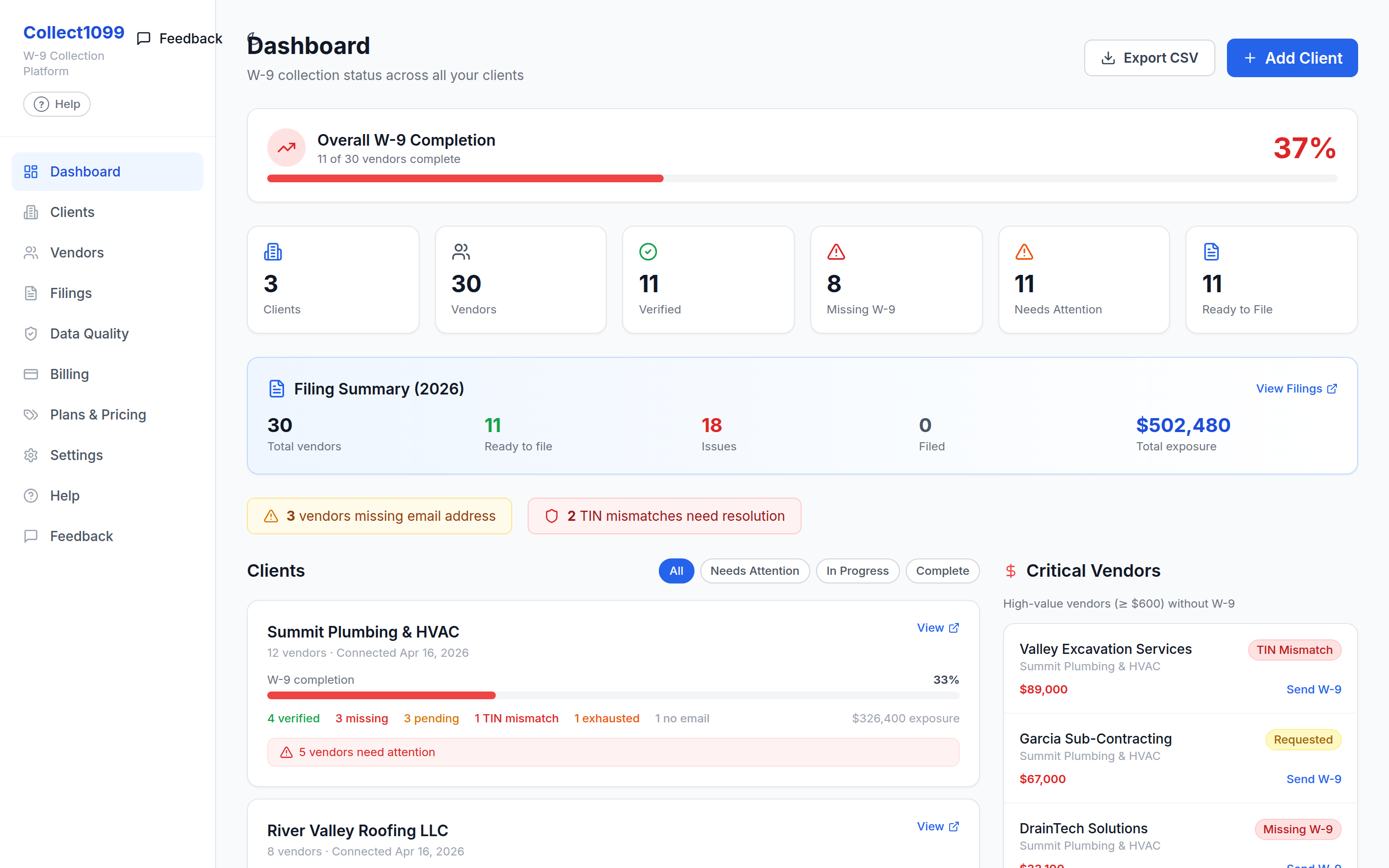
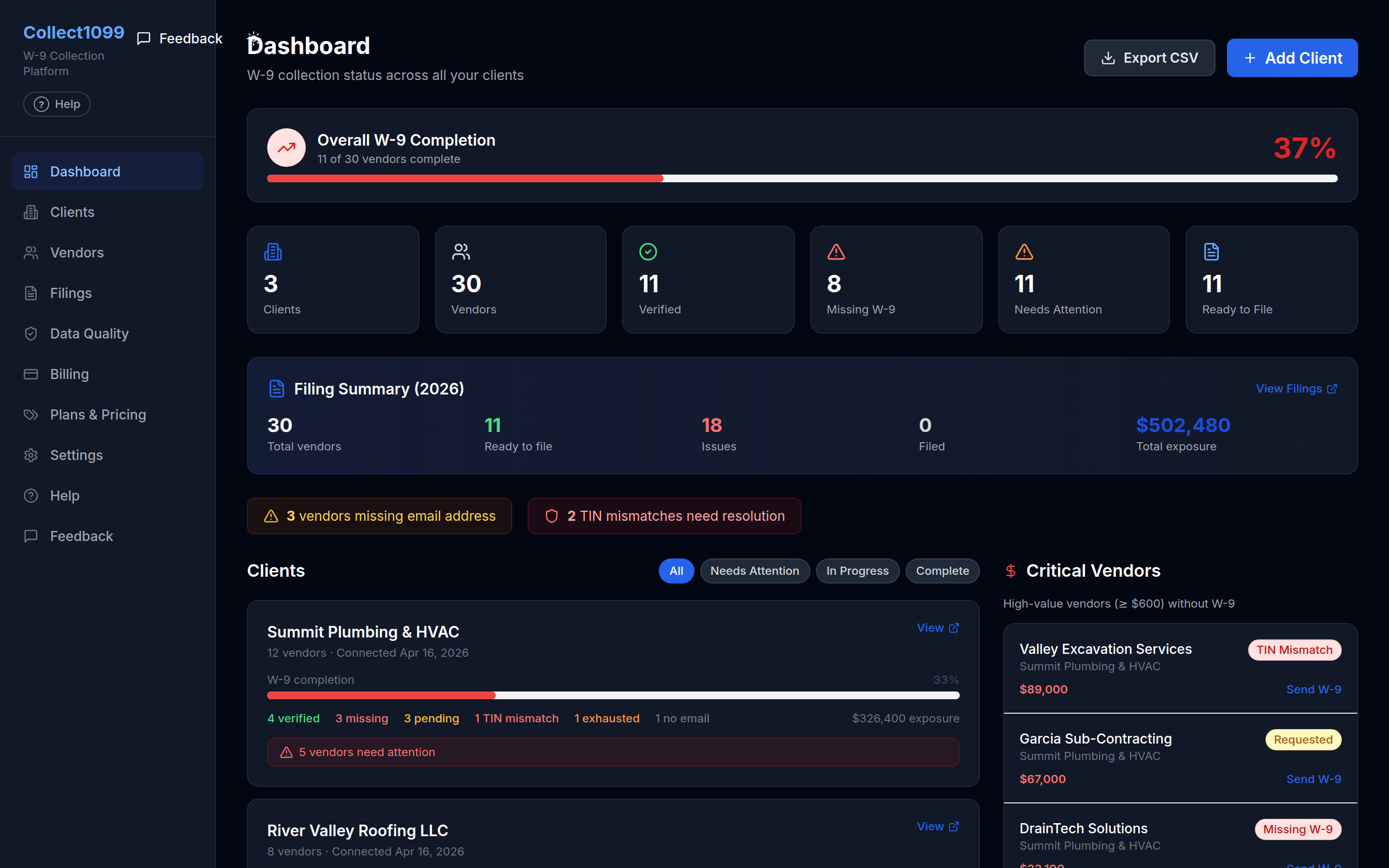
One dashboard across every client — completion, missing vendors, and 1099 exposure at a glance.
The workflow that didn't exist until now
Track1099 and Tax1099 assume you already have W-9s. QBO's 1099 module only activates at year-end. Collect1099 owns the gap in between.
Add clients & vendors
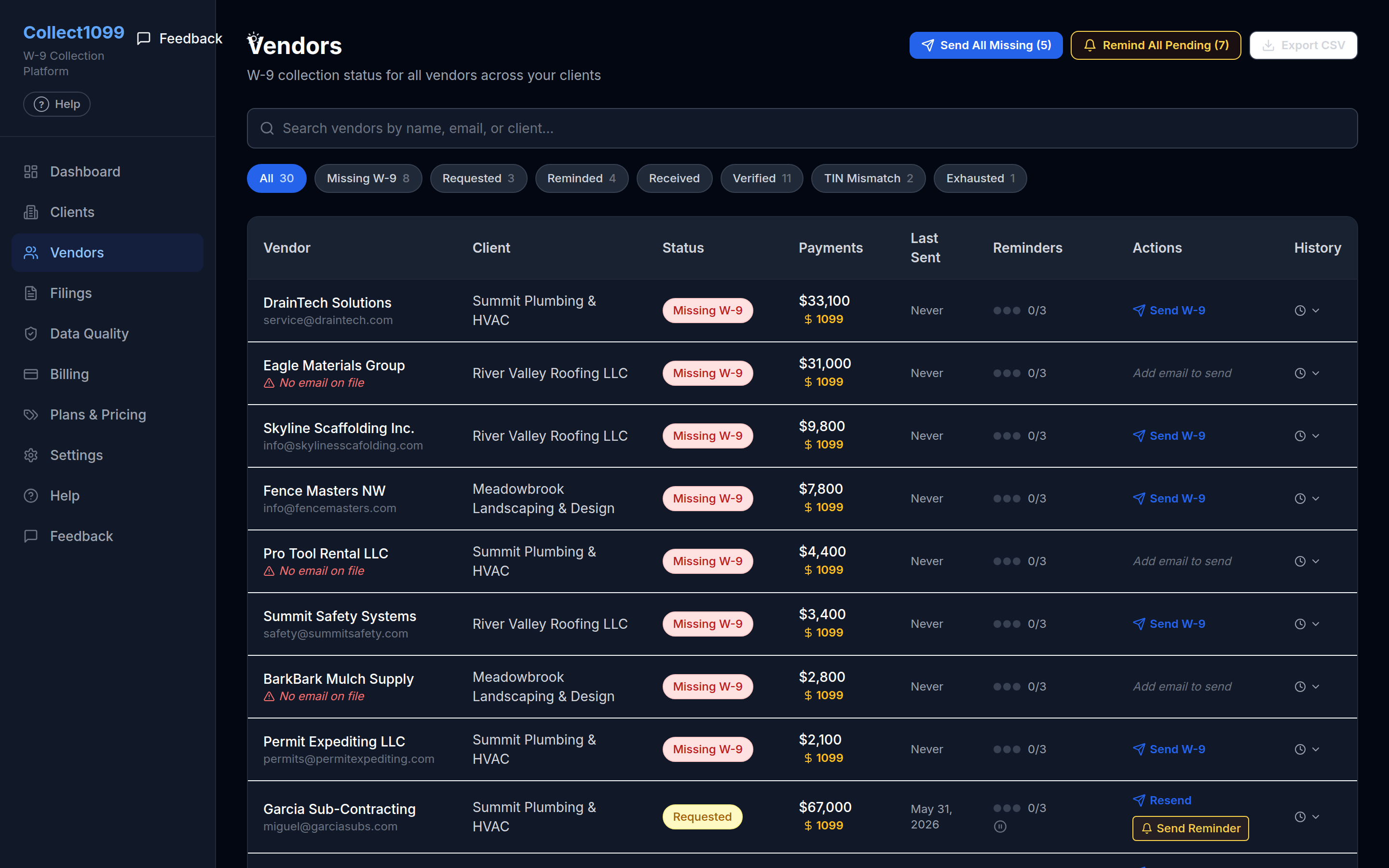
Manually add vendors or connect QuickBooks to auto-detect new vendors. No QBO required to get started.
W-9 requests sent automatically
Send secure W-9 collection links to vendors in one click. QBO integration auto-triggers on vendor creation.
Reminder ladder runs
Day 3, 10, and 30: automated reminders. Day 30 no response? You get an escalation alert.
January: 1099s ready
W-9 data feeds your 1099-NEC forms. Enter payment totals manually (QBO totals import is in preview), then review and submit.
One screen. All your clients.
The killer feature: a real-time dashboard showing every client, their W-9 completion rate, missing vendors highlighted in red, and 1099 exposure — all in one view.
No competitor offers this because they're form-filing tools, not operations-layer tools. You manage 30+ clients — you need to see across all of them.
Built for people who chase W-9s
Collect1099 is a collection-and-prep tool, not a tax preparer. It shines when W-9s pile up across many vendors — and it's honest about where it stops.
Bookkeepers with many clients
You manage the books for 5, 30, or 50 businesses and dread reconciling missing W-9s every January. One console shows every client at once.
Accounting & tax firms
Keep 1099 data clean all year so filing season is a review, not a fire drill — then hand clean data off to your e-file tool.
Businesses paying contractors
If you pay subs and vendors and want their W-9 on file before you cut the first check, Collect1099 automates the ask and the follow-up.
Not a fit if you just need to e-file a single 1099 and already hold the W-9 — a form-filing tool is simpler for that. Collect1099 earns its keep when collecting and chasing W-9s is the hard part. You always stay the responsible party: we prepare and organize, you review and file.
Simple, transparent pricing
Compare: Track1099 charges $2.99 per form to file (assuming you already have the W-9). Collect1099 does both — collection + filing — for less.
$19 / mo
Up to 5 clients included
- Unlimited W-9 collections
- Multi-client dashboard
- Automated reminder ladder
- TIN validation
- 1099-NEC pre-population
- 14-day free trial
$19 + $2/client/mo
For clients 6 and above
All plans include the same features. Price scales with your client roster, not a feature tier.
What the other tools miss
| Feature | Collect1099 | Track1099 | QBO Native |
|---|---|---|---|
| QBO vendor creation auto-trigger | Coming soon | ||
| Automated W-9 collection | |||
| Reminder ladder (day 3, 10, 30) | |||
| Multi-client console | |||
| TIN validation | |||
| 1099-NEC pre-population | |||
| E-filing passthrough | Coming soon | ||
| In-year monitoring |
Why bookkeepers trust Collect1099
No fake reviews, no invented stats — just how the product actually works.
Built for the whole year, not just January
Collect1099 collects W-9s the moment you add a vendor, so your 1099 data is ready before filing season instead of being a January scramble.
Sensitive data encrypted at rest
TINs, EINs, and SSNs are encrypted with AES-256 and transmitted over TLS. Vendors submit their W-9 through a secure, tokenized link — never loose email.
Your card never touches our servers
Billing runs entirely through Stripe's infrastructure — your payment details never pass through Collect1099.
You stay the responsible party
Collect1099 prepares and organizes; you review and file. We never determine your filing obligations or guarantee an outcome with the IRS.
Works with the tools you already use
Connect QuickBooks Online to auto-detect vendors, and configure Track1099 for IRS TIN matching and 1099 e-filing — or add vendors manually with no integration required.
One dashboard across every client
See W-9 completion, missing vendors, and 1099 exposure for all your clients in a single view, built for firms that manage many books.
Frequently asked questions
Straight answers about how Collect1099 collects W-9s and prepares your 1099s.
What does Collect1099 do?+
Collect1099 helps bookkeepers and businesses collect IRS Form W-9 information from vendors and prepare Form 1099 information across multiple clients. You add vendors manually or import them from QuickBooks Online, send secure W-9 collection links, run an automated reminder ladder, and have the data ready to pre-populate 1099-NEC forms — so you're not chasing W-9s in January.
Who is it for?+
It's built for bookkeepers, accountants, and businesses that manage 1099 vendors — especially firms juggling many clients. If you've ever scrambled to collect missing W-9s at year-end, Collect1099 is designed to make that workflow continuous instead of seasonal.
How is my vendors' sensitive tax data secured?+
Vendors submit their W-9 — including their TIN, EIN, or SSN — through a secure, tokenized collection link, not loose email. Those taxpayer identifiers are encrypted at rest using AES-256 and transmitted over encrypted TLS connections, with access protected by authentication and access controls. We use the data only to provide the service you direct, and we never sell it.
Does Collect1099 file my 1099s or give tax advice?+
No. Collect1099 is an informational data-collection and preparation tool — not a CPA, enrolled agent, tax preparer, or the IRS, and not a substitute for professional advice. It helps you organize W-9 data and prepare forms, but you are solely responsible for the accuracy, completeness, and timely filing of all tax forms and for verifying TIN and payee data. Always consult a qualified professional about your specific situation.
Which integrations does it support?+
You can connect QuickBooks Online (Intuit) to auto-detect and import vendors, and configure Track1099 for IRS TIN matching and 1099 e-filing. None of these are required to get started — you can add vendors and collect W-9s manually.
How does IRS TIN matching work?+
When you've configured Track1099, Collect1099 can run a TIN match to help you check that a vendor's name and TIN line up before you file. A match result is an aid, not a guarantee — it doesn't confirm a payee's actual identity or that a filing will be accepted by the IRS, so you remain responsible for verifying payee data.
How do W-9 reminders reach vendors?+
When you request a W-9, Collect1099 emails the vendor a secure collection link on your behalf, then runs an automated reminder ladder (around day 3, 10, and 30). If a vendor still hasn't responded by day 30, you get an escalation alert so nothing slips through.
How much does it cost and is there a trial?+
Plans start at $19/mo including up to 5 clients, with additional clients billed at $2/client/mo above that — so price scales with your roster, not a feature tier. Every plan includes the same features. There's a 14-day free trial and no credit card is required to start.
Can I cancel anytime?+
Yes. You can cancel at any time from your account settings or by emailing [email protected]. Cancellation takes effect at the end of your current billing cycle, and you keep access to paid features through the period you've already paid for. Fees for the current period are non-refundable except where required by law.
How long is my data kept?+
We keep W-9 and 1099 data while your account is active and afterward as needed to meet IRS recordkeeping requirements (generally at least four years for records supporting information returns) and other legal obligations. You can export your data and request deletion, subject to those retention rules.
How is this different from Track1099 or QuickBooks' 1099 tools?+
Track1099 and Tax1099 assume you already have the W-9s, and QuickBooks' 1099 module only really activates at year-end. Collect1099 owns the gap in between: collecting and chasing W-9s all year and giving you a multi-client console, then handing clean data off to e-filing when it's time to file.
Still have questions?
Start your 14-day free trialReady to stop the January scramble?
14-day free trial. Connect your first QBO client in under 5 minutes. No credit card required.
Start collecting W-9s today